

Century Web Design Century Web Design, Quality web site design, ecommerce, digital certificates and hosting.
Century Web Design
Support
Creating a CSR
Documentational Requirements
Installing a Certificate
Displaying your Secure Site Seal

Digital Certificates
Buy a Certificate now
FAQ'S
Compare Us
Browser Compatibility

General
Home
Other Services
Site Map
Contact Us

128-bit SSL Digital Web Certificates

Installing your Certificate with Website Pro 3.x

When your certificate is issued you will receive 3 certificates:

Yourdomain.crt
ComodoClass3SecurityServicesCA.crt
GTECyberTrustRootCA.crt

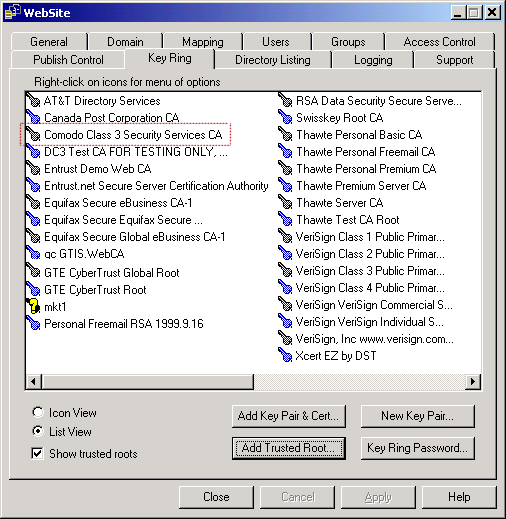
  • Add the ComodoClass3SecurityServicesCA.crt certificate as Trusted Roots:

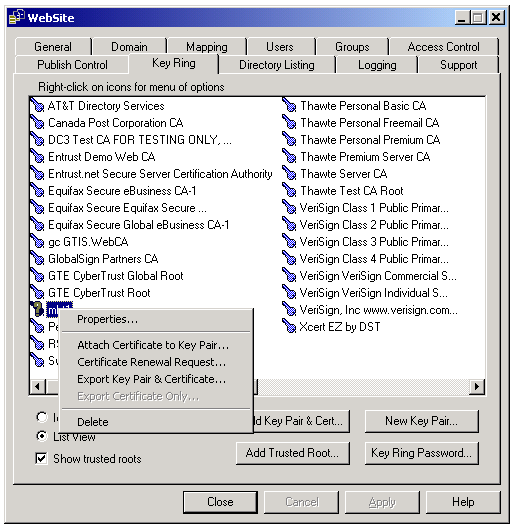
  • Then attach each certificate in turn to your website's Key Pair in the following order. At this point your Key Pair will be black.:
    Yourdomain.crt
    ComodoClass3SecurityServicesCA.crt
    GTECyberTrustRootCA.crt

  • Your Key Pair will turn now be green.
  • Once completed, you MUST delete the ComodoClass3SecurityServicesCA.crt
  • Ensure GTECyberTrustRootCA.crt remains in the Trusted Root area.
  • Stop and Start the server, your site can now be found using the https entry

For more details please fill in the enquiries form in our contact us section or call us on +44 (0) 870 2242499 or e-mail us at enquiries@centurywebdesign.co.uk

Digital Certificates | Buy a Certificate now | FAQ'S | Browser Compatibility | Compare Us
Support | Creating a CSR | Documentational Requirements | Installing a Certificate
Displaying your Secure Site Seal | Other Services | Site Map | Contact Us

Century Web Design, 9 Wheatley Rd, Cardiff, South Wales, CF5 4LT
Tel./Fax. +44 (0) 870 2242499, email: enquiries@centurywebdesign.co.uk